


WordBit Inglés
4.74.80K Reviews
App Specs
- Version
- 1.7.5.26
- Updated On
- License
- Free
- Downloads
- 10,000,000+
- Developer
- WordBit
- Categories
- Education
- Platform
- Android
Screenshots

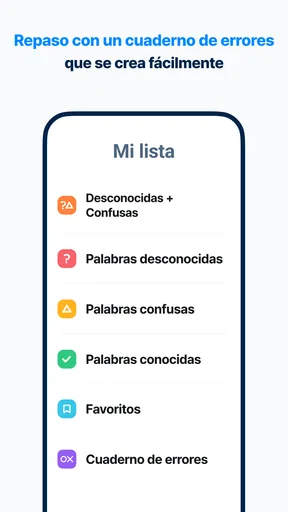

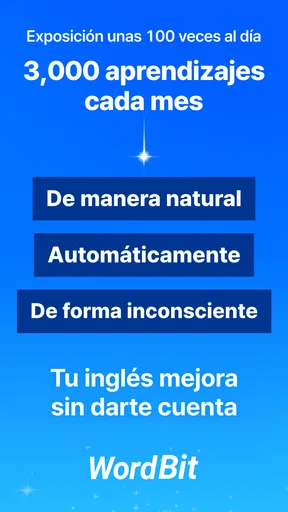
 Analysis by AppCompare
Learning English often fails for a surprisingly ordinary reason: I forget to make time for it. That is where WordBit Inglés takes a different approach. Instead of asking me to open a separate lesson whenever I feel motivated, it places vocabulary practice around a habit I already have—checking my phone. The idea is simple, but the experience is more useful than it first sounds because it turns small pauses into repeated contact with English.
After using it as an education app, I see it as a lightweight vocabulary companion rather than a complete language course. It is free, suitable for everyone, and developed by WordBit. Its average rating is 4.7 from around 47 thousand ratings, while its reach of over 10 million installs suggests that the lock-screen learning format has connected with a very large audience. I would recommend it to someone who wants more daily exposure without committing to long study sessions, although I would not treat it as a replacement for speaking practice, structured grammar lessons, or a full course.
How the current experience fits into everyday phone use
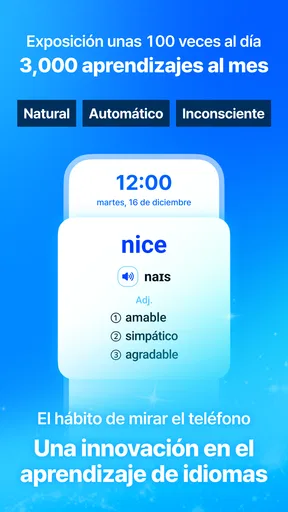
The central experience is built around interruption in the best possible sense. When I reach for my phone, the app gives me a chance to see English vocabulary before I continue to whatever I originally intended to do. That makes the learning feel less demanding than opening a traditional flashcard app, choosing a deck, and deciding how long to study.
This approach works particularly well for people who already check their phone many times during the day. A short encounter with a word can refresh recognition, reinforce a familiar term, or introduce something new. The value is not in one isolated screen; it comes from the repeated rhythm. I found that the app is easiest to maintain when I treat each appearance as a small reminder rather than a formal lesson I must complete perfectly.
That distinction matters. Many language apps are designed around deliberate sessions, progress paths, exercises, and a clear beginning and end. WordBit Inglés is more ambient. It tries to insert English into the spaces between other activities. If you enjoy a calm, low-pressure routine, this can be a strength. If you need a carefully sequenced curriculum, it may feel too limited on its own.
The app’s store summary describes learning whenever the phone is opened, but my practical takeaway is more specific: it reduces the effort required to start. I do not have to remember to search for a lesson every time. That lower barrier is useful on busy days, when I might skip a conventional study app entirely.
A realistic routine for a busy learner
Imagine checking your phone while waiting for a bus, between meetings, or before replying to a message. A conventional lesson might feel excessive in those moments, but a single vocabulary prompt is manageable. I would use the first appearance to recall the meaning before looking at the answer, then mentally connect the word with a sentence I might actually say. Later, another encounter can act as a quick test of whether the word stayed in memory.
Worth Reading Before You Choose

EA SPORTS FC Mobile 26 Is a Bigger Football Game, but It Takes Time

Flipboard Shows What News Apps Must Do Beyond the Feed

Switching to Android Auto Means Rethinking Your Driving Routine

Google Calendar Makes a Crowded Week Easier to Manage

Ludo King Makes the Most of the Minutes Between Plans

Baby Panda World Brings Quick Play to Modern Phones, but Its Game Library Feels Busy
This is one of the app’s less obvious strengths: it can turn dead time into repeated retrieval opportunities without requiring me to schedule a study block. The trade-off is that the routine can become passive. Simply seeing a translation is not the same as producing English. I get more from it when I pause, cover the answer mentally, pronounce the word, and create a short phrase before moving on.
What the app is and what it is not
I would classify this as a vocabulary exposure tool, not a complete English-learning system. It can support word recognition and help keep English present in my day, but it should sit beside other activities if my goal is confident conversation. Listening to real speech, writing messages, practicing pronunciation, and receiving corrections require different kinds of work.
That makes the app especially suitable for beginners who need frequent contact with common English, returning learners who want to rebuild a habit, and intermediate users who want to keep vocabulary active. It is less suitable for someone preparing for an exam who needs a controlled syllabus, detailed grammar explanations, or measurable practice across every language skill.
What the current version suggests about its evolution
The current version is 1.7.5.26, and the app was released on Jul 17, 2017. That history gives the product a different feel from a newly launched learning experiment. It has had time to establish its distinctive phone-based method, and the large user base indicates that the basic idea has remained relevant. At the same time, I would not assume that a long presence automatically means the experience matches the newest, most interactive language platforms.
What I can judge directly is the direction of the product: WordBit Inglés stays focused on making vocabulary appear in the flow of phone use rather than turning the phone into a classroom with a long sequence of activities. That focus is important. A product can become less useful if it adds so many systems that the original habit becomes complicated.
For existing users, the current version should be understood as an iteration of a familiar concept rather than a complete change of identity. If you already like learning through brief prompts, the main benefit is continuity. You can keep the habit without rebuilding your study method around a new course structure. If you were hoping for a major shift toward conversation simulations or comprehensive lessons, this format may still feel narrow.
The minimum operating requirement is Android 7.0, which makes the app accessible on a broad range of Android devices. I appreciate that because a vocabulary tool loses much of its usefulness if it is restricted to only recent phones. The age rating is Everyone, so it is also an uncomplicated option for households looking for a general English-learning app rather than entertainment aimed at a specific age group.
How I would use the version without wasting its advantage
My first tip is to avoid treating every prompt as something to rush through. The app’s convenience can encourage skimming, especially when I am trying to unlock the phone quickly. A better workflow is to give myself a few seconds: read the word, guess its meaning, say it quietly, and connect it to a personal example. That turns an interruption into retrieval practice.
My second tip is to separate recognition from production. If I recognize a word but cannot use it, I do not yet own it. After seeing a new term, I would write or say a short sentence such as “I need to check the schedule” or “The room is quiet.” The sentence does not need to be sophisticated. The important step is moving from identifying a word to placing it in a usable context.
A third useful habit is to let the app complement, rather than replace, a focused session. I might use the phone prompts during the day, then spend a few minutes later reviewing the words that actually mattered to me. This combination gives the app a role in both exposure and reinforcement without demanding that it carry the entire learning process.
The effect on people who already have a study system
If you already use flashcards, WordBit Inglés can work as a gentle reminder layer. It may help keep English active between deliberate reviews, but I would not automatically duplicate every word in multiple systems. Too much repetition across apps can create maintenance work instead of learning. I would choose one main tool for organized review and use this app for casual exposure.
For someone who has abandoned language apps because daily streaks feel stressful, the phone-based format may be more forgiving. There is less pressure to sit down and complete a visible lesson. However, that freedom also means the learner must create their own discipline. The app can make contact easier, but it cannot decide whether I am truly paying attention.
For parents or families, the Everyone rating makes the app broadly approachable, but I would still guide younger learners toward active use. A child who only taps past prompts may gain little from the experience. Asking them to use a new word in a sentence or identify it in a song, book, or conversation would make the passive moments much more meaningful.
Where the experience still has gaps
The biggest limitation is the narrowness of the lock-screen learning model. Vocabulary is important, but knowing individual words does not automatically teach word order, listening comprehension, natural phrasing, or conversation strategy. I would miss those elements if this were my only English resource.
There is also a tension between convenience and attention. The app appears in a context where I usually have another objective, so I may dismiss it without thinking. That is not necessarily a flaw in the software, but it affects results. The method depends on turning brief exposure into active recall; otherwise, it becomes background decoration.
Another gap is suitability for different learning goals. A traveler who needs a few practical phrases may want scenario-based practice. A student preparing for a formal test may need targeted vocabulary, grammar explanations, and exercises with clear feedback. A professional may need industry-specific language. WordBit Inglés can support those users, but it does not appear to be the best single solution for any of those specialized needs.
I also would not choose it if I strongly dislike learning through phone interruptions. Some people protect their lock screen as a clean, distraction-free space. For them, the app’s defining feature could feel intrusive rather than helpful. A conventional flashcard app opened at a chosen time would be a better match.
How it compares with ordinary alternatives
Compared with a traditional flashcard app, WordBit Inglés removes the need to remember to open the study tool. That is its clearest advantage. Traditional flashcards usually provide more control over decks, review timing, and study sessions, while this app offers more automatic exposure. I would choose the former for systematic memorization and the latter for habit-building.
Compared with a full language course, it is lighter and less demanding. A course normally gives me a path through vocabulary, grammar, listening, and exercises. This app is easier to fit into a crowded day, but it cannot provide the same breadth. The practical choice depends on whether my biggest problem is lack of time or lack of structure.
Compared with simply changing my phone language to English, the app provides a more focused learning prompt. Changing the system language can expose me to familiar interface terms, but it rarely teaches enough vocabulary by itself. WordBit Inglés creates a deliberate learning moment while still using the phone as the setting.
The best comparison is not that it replaces these alternatives, but that it occupies a different place in a routine. I would use it as the low-friction layer, then add conversation, listening, reading, or structured review according to my goal.
What to watch as you keep using it
When deciding whether to keep the app installed, I would watch one practical question: am I recalling words, or merely seeing them? If I can regularly predict meanings, pronounce terms, and use some of them later, the approach is working for me. If every prompt disappears from memory immediately, I need a more active review method alongside it.
I would also pay attention to interruption fatigue. The right balance is personal. If prompts help me notice English without irritating me, the habit has value. If I start dismissing them automatically, I would adjust my phone routine or rely more on scheduled study. The app is strongest when it remains welcome enough to be noticed.
Finally, I would judge progress by real-life usefulness rather than by the number of prompts seen. Can I understand more of a message? Do familiar words come to mind faster? Can I use a new expression without translating first? Those are better tests of whether the app is contributing to my English than simply having it present on the device.
My recommendation for the right kind of learner
WordBit Inglés is a smart choice for anyone who wants free, low-pressure vocabulary contact and already spends plenty of time checking an Android phone. Its age rating of Everyone, broad device support from Android 7.0 onward, and focused design make it easy to try without turning learning into a major project. The developer, WordBit, has built the experience around consistency rather than spectacle, and I think that restraint is part of its appeal.
I would recommend it most strongly to beginners, busy learners, and people rebuilding a study habit. I would pair it with listening and speaking practice, especially if conversation is the goal. I would skip it as a primary solution if I need a complete course, detailed progress structure, or exam-focused preparation.
My final opinion is positive but measured: this app makes vocabulary practice easier to start, and that is a real advantage. Its success depends on what I do with the small moments it creates. If I actively recall, pronounce, and reuse the words, those moments can accumulate into useful progress. If I only swipe past them, the convenience will not be enough. As a free education app with a 4.7 average and more than 10 million installs, it has clearly found a practical niche, and I think it deserves a place in a broader English routine for learners who value consistency over long lessons.
Pros
- Short daily lessons fit easily into busy schedules.
- Lock-screen access encourages frequent vocabulary practice.
- Includes pronunciation audio for improving listening and speaking.
- Progress tracking helps maintain a consistent learning routine.
- Useful for beginners building a practical English word base.
Cons
- The lock-screen format may feel intrusive for some users.
- Free content can include frequent advertisements.
- Vocabulary practice may feel repetitive over time.
- Advanced learners may find the word difficulty too limited.
- Some features may require an internet connection or premium access.
FAQs for WordBit Inglés
What is WordBit Inglés and how does it help you learn English?
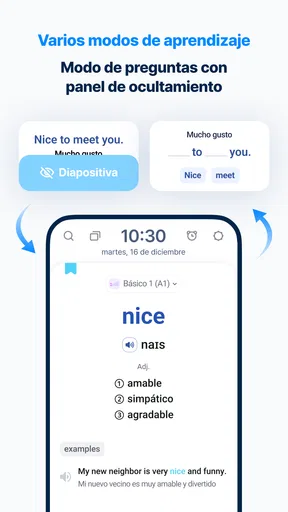
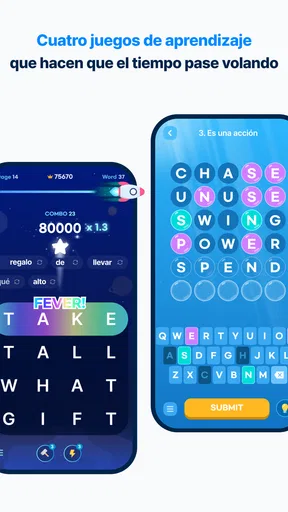
WordBit Inglés is a vocabulary-learning app designed to turn small moments of your day into English practice. Its main feature displays English words and expressions on your phone’s lock screen, so you can review them whenever you unlock the device. The app generally includes translations, example sentences, pronunciation support, and short quizzes to reinforce memorization without requiring a long, dedicated study session.
Does WordBit Inglés work for beginners, or is it better for advanced learners?
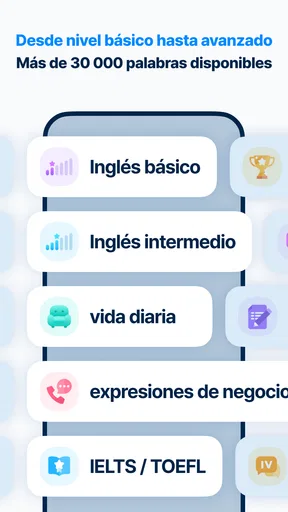
The app can be useful for a wide range of learners, including beginners who are building basic vocabulary and intermediate users who want to expand their everyday English. Content is commonly organized by topics or difficulty levels, allowing you to choose material that matches your ability. However, it focuses mainly on vocabulary, so advanced learners may need additional apps or courses for detailed grammar, writing, and conversation practice.
Does WordBit Inglés require an internet connection?
WordBit Inglés is designed for frequent, convenient review and may allow at least some previously downloaded or stored learning content to remain available offline. Nevertheless, an internet connection can be necessary for downloading new word lists, synchronizing settings, updating lessons, loading certain audio features, or displaying advertisements. If offline study is important to you, check the app’s current store description and test the selected lessons before relying on it without mobile data.
Can I customize the lock-screen lessons and notifications?
The app typically provides settings that let you control how often vocabulary appears, select learning levels or categories, and adjust notifications or display behavior. These options are helpful if you want fewer interruptions or prefer studying specific topics. Because the lock-screen feature is central to the experience, you should review the permissions and settings carefully after installation. Some phones may also require battery or background-activity permissions for consistent operation.
Is WordBit Inglés free to download, and are there advertisements or paid features?
WordBit Inglés can generally be downloaded and used without an upfront purchase, but the free version may include advertisements and optional premium features. Depending on the current release, paid options may remove ads or unlock additional learning content and controls. Pricing and available subscriptions can change by country and platform, so review the Google Play or App Store listing before downloading and check any trial or renewal terms carefully.


